Phone storage and Wi-Fi
Videos on Wi-Fi only
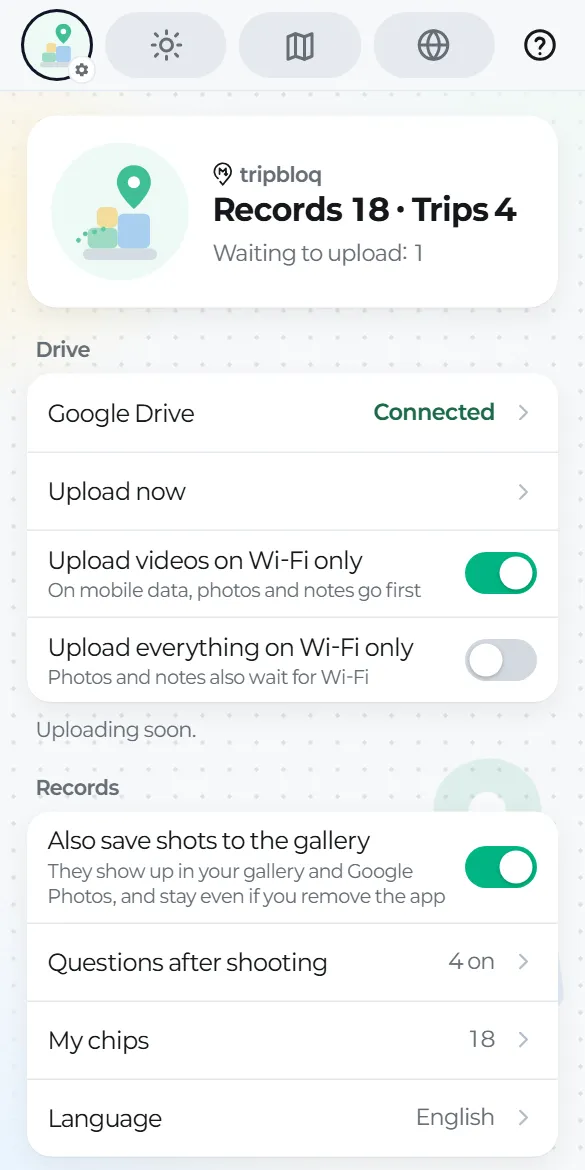
Settings → Upload videos on Wi-Fi only (on by default). On mobile data, photos and notes go first and videos wait for Wi-Fi.
Turn on "Upload everything on Wi-Fi only" to keep photos and notes off mobile data too.
Saving to your gallery too
With "Also save shots to the gallery" on (the default), photos and videos taken with the app's camera also appear in your phone's gallery, so they stay even if you remove the app.
Phone storage
- See how much space the app uses, and how much of that is originals already in Drive.
- "Free up uploaded originals" removes only the copies on your phone and keeps the files in Drive. Small previews stay, and tapping one opens the file in Drive.
- "Free originals 7 days after upload" does this automatically (off by default).