Voice notes
Speak, and it becomes text
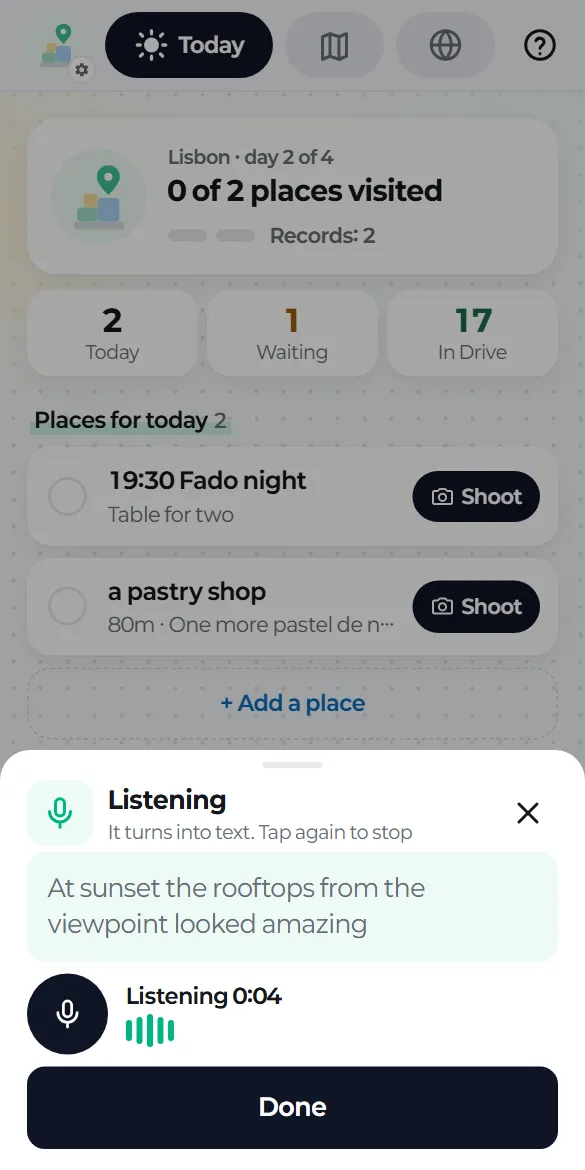
Tap the voice circle on the left of the bottom bar and the app starts listening. Your words appear as you speak. Tap again, or tap "Done", to stop.
The text joins the last record's note (same place, within 10 minutes) or becomes a new record. A record with just a note and no photos is perfectly fine.
Fixing mistakes
Tap the transcribed text to edit it. In a record's edit screen, "Add by voice" adds a new line to the note.
Offline
If your phone has on-device speech recognition, this works without internet. If it doesn't, the app keeps an audio file (m4a) instead and lets you know.
If it didn't catch that
You'll see "Didn't catch that" with a button to try again, and no empty note is saved.
Your phone does the recognition
Transcription uses Android's built-in speech recognizer. When you're online, your phone's recognizer may send the audio to Google to turn it into text, depending on your phone's settings. tripbloq doesn't keep that audio.