Add places from a map app
Share → tripbloq
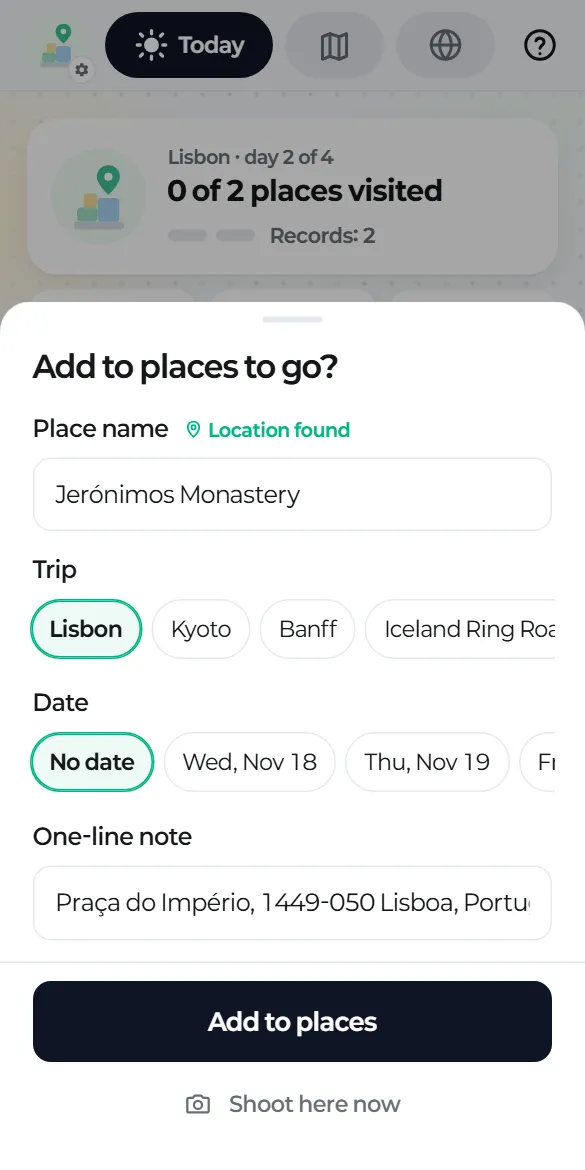
In Google Maps or another map app, open a place, tap Share, then choose tripbloq. You'll see "Add to places to go?".
What you can set
- Place name: you can edit it. When the location is found, a pin appears next to it.
- Trip: the trip you're on is selected first. No trips yet? Type a name and dates to create one right there.
- Date: "No date" by default.
- Memo: filled in with the address.
Tap "Add to places" and you're done. If you share the same place again, the app tells you it's already there.
How the location is found
If the shared link includes coordinates, the app uses them as they are. If not, it opens that link's address once to read the location. Offline, it saves the name and link and fills in the location the next time you open the app.
Places with a location show how far away they are, and when you're within 200 m, the bottom bar switches to that place automatically.